
Examples use synthetic data. AI assistance was used in preparation; verification scope is stated below.
Changing theme should not require rebuilding an entire preferences map. But the shape of a Firestore update determines whether you replace that map or update one leaf inside it.
Disclosure: This is an AI-assisted technical article prepared for Cengal, a Firestore developer tool. The examples and original code-generated illustrations use synthetic data, not customer records. You do not need Cengal or a paid product to use the solution.
A real report, not a newly discovered incident
On March 7, 2018, a developer reported on Stack Overflow that updating a map’s test field also removed its sibling test2. Their shown update supplied the parent field with a new object.
That code is consistent with the map-replacement behavior described in Firebase’s nested-field guidance. This does not establish the complete cause of that developer’s environment, nor show how often the issue occurs today. It gives us a concrete behavior to reproduce rather than a reason to blame a console, cache or SDK bug.
Reproduce the distinction with one disposable document
The following is Node.js server SDK code using @google-cloud/firestore, not the modular Web SDK or Flutter API. Run it against a local emulator, never a real collection you care about. Install the SDK in your own scratch project and start a Firestore emulator on 127.0.0.1:8080 with project ID demo-map-example first. Server libraries do not exercise client Security Rules.
const { Firestore } = require('@google-cloud/firestore');

// Fail closed rather than accidentally using production credentials.
if (process.env.FIRESTORE_EMULATOR_HOST !== '127.0.0.1:8080') {
  throw new Error('Start the local emulator and set FIRESTORE_EMULATOR_HOST');
}
const db = new Firestore({ projectId: 'demo-map-example' });
const ref = db.collection('profiles').doc('demo');
const seed = {
  name: 'Ada',
  preferences: { theme: 'dark', notifications: true }
};

async function run() {
  await ref.set(seed);
  await ref.update({ preferences: { theme: 'light' } });
  console.log((await ref.get()).data());
  // { name: 'Ada', preferences: { theme: 'light' } }

  await ref.set(seed); // reset only this disposable fixture
  await ref.update({ 'preferences.theme': 'light' });
  console.log((await ref.get()).data());
  // { name: 'Ada', preferences: { theme: 'light', notifications: true } }
}
run()
  .catch(error => {
    console.error(error);
    process.exitCode = 1;
  })
  .finally(() => db.terminate());
Set FIRESTORE_EMULATOR_HOST=127.0.0.1:8080 in that scratch project’s shell before running. If your emulator uses another port, change both the environment value and the guard. The demo- project name and explicit local-host guard are deliberate safety boundaries.
The update key defines the boundary
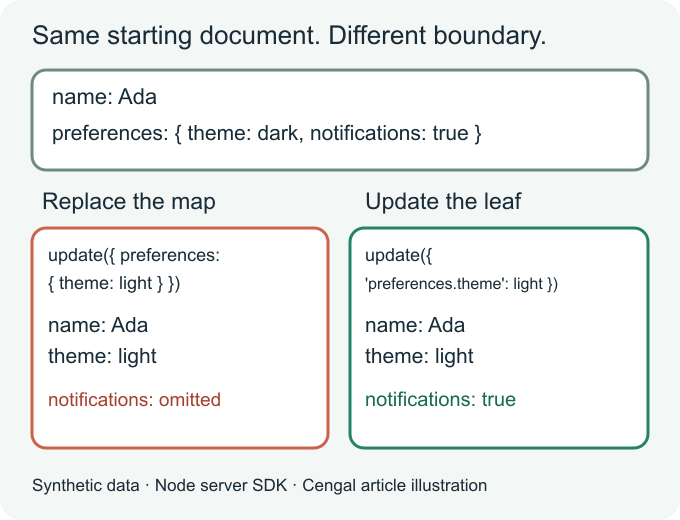
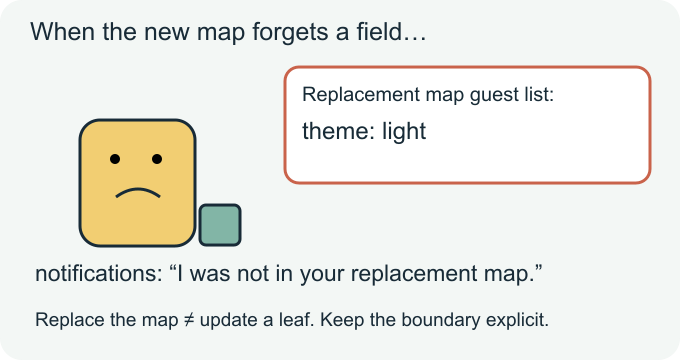
preferences targets the map value. The supplied { theme: 'light' } becomes that value; omitted map siblings do not survive. The unrelated top-level name still survives because this is an update of preferences, not a replacement of the whole document.
'preferences.theme' targets one nested field. Firestore changes that leaf without replacing the surrounding map. Quotes matter here: this is a string field path in the update object.
What if a field name itself contains a dot?
A literal field name a.b is not the same as a nested a map containing b. For the Node server SDK, pass separate literal segments to FieldPath, using the alternating field-path/value update overload:
Inside an async function using the existing ref:
const { FieldPath } = require('@google-cloud/firestore');
await ref.update(new FieldPath('preferences', 'a.b'), true);
// preferences now includes the literal key "a.b": true

await ref.update({ 'preferences.a.b': true });
// This instead targets preferences -> a -> b.
Do not put a FieldPath object into a computed JavaScript object key; that coerces it to a string. Do not concatenate arbitrary field names into dotted paths if those names may contain dots. Use the SDK’s field-path API appropriate to your platform.
A small patch is not a concurrency strategy
Suppose another writer turns notifications off. A subsequent theme-only leaf update leaves that newer notifications value alone. A stale whole-map update can put the old notifications value back.
That does not make leaf updates conflict-proof. Two writers setting the same leaf can still overwrite one another. If a write must depend on values you read, evaluate a Firestore transaction and its retry behavior. A field path is not undo, a backup, a restore mechanism or an array-index editing API.
Also, update() requires an existing document. Do not silently switch to a create-capable write just to make a missing-document error disappear; first decide whether creation is actually intended.
What was tested—and what was not
On October 21, 2026, the accompanying local test used Firestore emulator 1.22.0 and Node server SDK 7.11.6 with a demo- project on loopback. Seven assertions passed: parent-map replacement; leaf-path preservation; literal dotted names; nested dotted paths; rejection of an update to a missing document; preservation of a newer sibling by a leaf patch; and overwriting of that sibling by a stale whole map.
Each case reset synthetic data. The two-writer cases used deterministic sequential interleavings, not a concurrency stress test. These results validate the example’s map/path semantics, not production IAM, client Rules, indexes, billing, or Cengal’s editor. A full-document JSON save in any tool is not automatically equivalent to a leaf-path SDK update.
Before changing a real document
- Identify the exact field you intend to change, and whether any segment contains a literal dot.
- Reproduce the update shape with disposable emulator data.
- Read the result back and check the fields you expected to remain.
- Handle missing documents and read-dependent writes deliberately. Apply your normal access controls and recovery practices before production changes.
Which boundary has caused more surprises in your application: replacing a nested map, handling literal dotted field names, or coordinating two writers? A small anonymized before/update/after example makes the distinction easier to discuss.